How Long Do Instagram, TikTok and Facebook Media URLs Last? We Read 460,000 Expiry Stamps
Media links from TikTok, Instagram and Facebook are temporary. TikTok cover images and avatars expire about 24 hours after you fetch them. Instagram images last about 4.4 days. Instagram video files last about 34 hours.
The expiry time is written into each URL, so you don't have to guess. We read it from more than 460,000 unique media links in API responses we pulled on 19 October 2026, and measured how long each kind of link stays valid.
How long each kind of link lasts
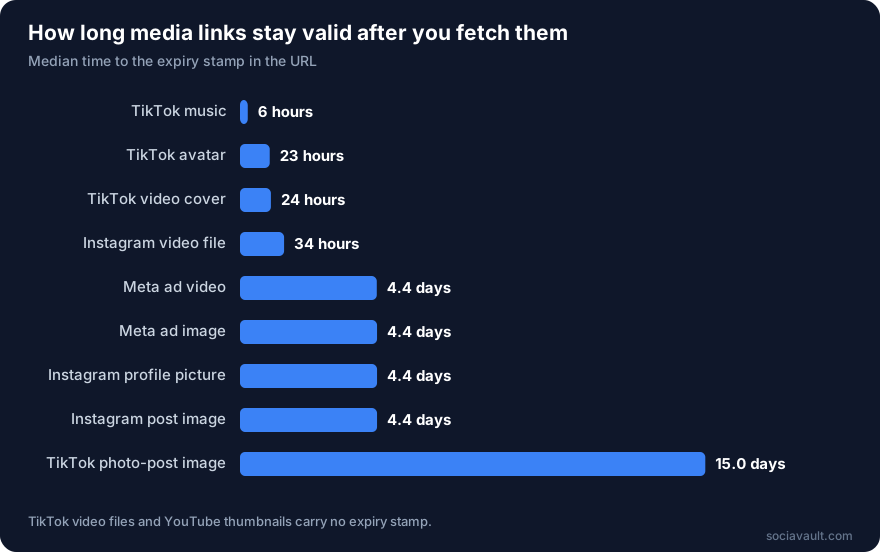
| Media | Links measured | Shortest | Median | Longest |
|---|---|---|---|---|
| TikTok music | 47 | 6 hours | 6 hours | 6 hours |
| TikTok avatar | 37,972 | 23 hours | 23 hours | 48 hours |
| TikTok video cover | 105,612 | 5 hours | 24 hours | 15 days |
| Instagram video file | 5,457 | 32 hours | 34 hours | 4.5 days |
| Meta ad video | 2,958 | 32 hours | 4.4 days | 4.5 days |
| Meta ad image | 26,153 | 4.3 days | 4.4 days | 30 days |
| Instagram profile picture | 16,854 | 4.3 days | 4.4 days | 4.5 days |
| Instagram post image | 259,089 | 4.3 days | 4.4 days | 4.5 days |
| TikTok photo-post image | 8,932 | 15 days | 15 days | 15 days |
| TikTok video file | 136,042 | No stamp | No stamp | No stamp |
| YouTube thumbnail | 2,877 | No stamp | No stamp | No stamp |
Times are from the moment the link was fetched. The spread is narrow: 98.7% of TikTok covers expired within 24 hours, and every Instagram post image within 4.5 days.
Two kinds of link carry no expiry stamp. YouTube thumbnails on i.ytimg.com are stable and safe to store. TikTok video file links don't show an expiry time, but we didn't test how long they keep working, so treat them as short-lived too.
Why the links expire
These are signed CDN links, a standard way to protect hosted media. The platform adds an expiry time and a signature to each URL, and its servers refuse the link once the time passes. Changing the expiry yourself breaks the signature, so there's no way to extend one.
That's why a profile picture that loaded fine yesterday shows a broken image today, and why Instagram returns "URL signature expired." The link was never meant to be permanent. We cover the fix in detail in why profile picture URLs expire.
How to read the expiry from a URL
Each platform writes the expiry time in a query parameter:
| Platform | Parameter | Format |
|---|---|---|
Instagram and Facebook (cdninstagram.com, fbcdn.net) | oe | Unix time in hexadecimal |
TikTok (tiktokcdn.com and similar) | x-expires | Unix time in seconds |
This reads it and tells you how long a link has left. In JavaScript:
function expiresAt(url) {
  const q = new URL(url).searchParams;
  if (q.has("oe")) return parseInt(q.get("oe"), 16); // Instagram and Facebook: hex Unix time
  if (q.has("x-expires")) return Number(q.get("x-expires")); // TikTok: Unix time in seconds
  return null; // no stamp, e.g. YouTube thumbnails
}

function hoursLeft(url) {
  const t = expiresAt(url);
  return t === null
    ? null
    : Math.round(((t - Date.now() / 1000) / 3600) * 10) / 10;
}

// a negative number means the link has already expired
console.log(
  hoursLeft(
    "https://scontent.cdninstagram.com/v/t51/abc.jpg?stp=dst-jpg&oe=6A0D6E08&_nc_cat=1",
  ),
);
And in Python:
import time
from urllib.parse import urlparse, parse_qs

def expires_at(url):
    q = parse_qs(urlparse(url).query)
    if "oe" in q:  # Instagram and Facebook: hex Unix time
        return int(q["oe"][0], 16)
    if "x-expires" in q:  # TikTok: Unix time in seconds
        return int(q["x-expires"][0])
    return None  # no stamp, e.g. YouTube thumbnails

def hours_left(url):
    t = expires_at(url)
    return None if t is None else round((t - time.time()) / 3600, 1)

# a negative number means the link has already expired
print(hours_left("https://scontent.cdninstagram.com/v/t51/abc.jpg?stp=dst-jpg&oe=6A0D6E08&_nc_cat=1"))
Use this before you save or display a link. If there's less than an hour left, fetch a fresh one.
What to do about it
- Download media when you collect it. If you need the image or video later, save the file to your own storage the same day. For TikTok, that means within a few hours.
- Store the post's ID, not its media URL. The TikTok video ID or the Instagram shortcode never changes. Keep that, and you can always get a fresh link.
- Re-fetch to refresh. An expired link can't be fixed, but calling the post or profile endpoint again returns new, valid links. With SociaVault that's 1 credit per post or profile.
- Check before you show. If you display images in a dashboard, read the expiry and refresh links that are close to it, rather than waiting for them to break.
- Don't put media URLs in long-lived places. Emails, PDFs and spreadsheets outlive the links. Use your own copy of the file instead.
A simple rule of thumb: TikTok links are good for a day, Instagram and Facebook images for four days, and Instagram videos for a day and a half. Plan for less.
Download and keep a copy
This saves a post's images while their links are still valid. Only keep copies of media you have the right to store, such as your own posts or content you've licensed. In JavaScript (Node 18 or later, as an .mjs file):
import { mkdir, writeFile } from "node:fs/promises";

const API = "https://api.sociavault.com/v1/scrape";
const HEADERS = { "x-api-key": process.env.SOCIAVAULT_API_KEY };

// Lists can come back as arrays or as objects with numbered keys
const asList = (x) => (Array.isArray(x) ? x : Object.values(x ?? {}));
const sleep = (ms) => new Promise((resolve) => setTimeout(resolve, ms));

const params = new URLSearchParams({ handle: "natgeo" });
const res = await fetch(`${API}/instagram/posts?${params}`, {
  headers: HEADERS,
});
if (!res.ok) throw new Error(`HTTP ${res.status}: ${await res.text()}`);
const data = (await res.json()).data ?? {};

await mkdir("media", { recursive: true });
for (const post of asList(data.items)) {
  const [first] = asList(post.image_versions2?.candidates);
  if (!first?.url || !post.code) continue;
  const image = await fetch(first.url);
  if (image.ok)
    await writeFile(
      `media/${post.code}.jpg`,
      Buffer.from(await image.arrayBuffer()),
    );
  await sleep(500);
}
And in Python:
import os
import pathlib
import time

import requests

API = "https://api.sociavault.com/v1/scrape"
HEADERS = {"x-api-key": os.environ["SOCIAVAULT_API_KEY"]}

def as_list(x):
    # Lists can come back as lists or as dicts with numbered keys
    return list(x.values()) if isinstance(x, dict) else (x or [])

r = requests.get(f"{API}/instagram/posts", headers=HEADERS,
                 params={"handle": "natgeo"}, timeout=60)
r.raise_for_status()
data = r.json().get("data") or {}
out = pathlib.Path("media")
out.mkdir(exist_ok=True)
for post in as_list(data.get("items")):
    candidates = as_list((post.get("image_versions2") or {}).get("candidates"))
    if not candidates or not post.get("code"):
        continue
    image = requests.get(candidates[0]["url"], timeout=60)
    if image.ok:
        (out / f"{post['code']}.jpg").write_bytes(image.content)
    time.sleep(0.5)
The file is named after the post's shortcode, so you can always match it back to the post and re-fetch fresh links later.
How we did it
- Links: every media URL in the responses from our October 2026 research pulls, deduplicated: TikTok creator videos, Instagram posts and hashtag searches, Meta Ad Library results and YouTube channel videos. More than 460,000 links had an expiry stamp and about 157,000 did not.
- Measure: the expiry time in each URL minus the time we fetched it.
- Cost: nothing extra. We read links from responses we'd already pulled for other studies.
Limits. We read the expiry stamp, we didn't test when each link actually stopped working, and a CDN can refuse a link earlier. Lifetimes can change whenever a platform changes its CDN settings, so check the stamp in your own data rather than hard-coding these numbers. The table is in the CSV download.
Frequently Asked Questions
How long do Instagram image URLs last?
About 4.4 days from when you fetch them. Every Instagram post image and profile picture in our data expired within 4.5 days. Instagram video files expire sooner, at about 34 hours.
How long do TikTok image URLs last?
About 24 hours for video covers and avatars. Images in TikTok photo posts last longer, about 15 days, and music links about 6 hours.
Why does my Instagram image say "URL signature expired"?
The link was signed with an expiry time, and that time has passed. You can't extend it. Fetch the post or profile again to get a new link.
Can I make an expired media URL work again?
No. The expiry is part of the signature, so editing it breaks the link. Request the content again to get a fresh URL.
Do YouTube thumbnail URLs expire?
No. Thumbnails on i.ytimg.com carry no expiry and are safe to store.
Building something that stores social media images? Sign up for 50 free credits and pull fresh links whenever you need them.
Found this helpful?
Share it with others who might benefit
Ready to Try SociaVault?
Start extracting social media data with our powerful API. No credit card required.